Exports overview
The Export menu, what each item writes, the exports that sit with their own tools, and what each one needs before it runs.
Export ▾ holds the plant's file exports. It sits beside Save project at the right of the view tabs, in every view. Its main item, Export deliverables…, writes the whole design as one package in one folder: the drawing set, the design report, the schedules, the bill of materials, the KMZ and a manifest. The other items write one file each.
The Export menu
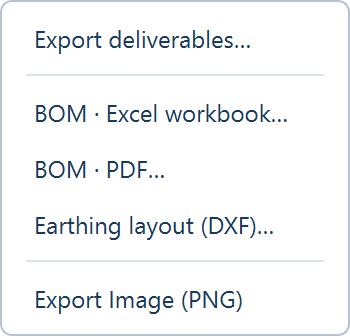
| Item | Writes | Available |
|---|---|---|
| Export deliverables… | The package, into a folder of its own. See Export deliverables | With any generated layout, including one that is out of date |
| BOM · Excel workbook… | The bill of materials as a workbook. See Bill of materials | The BOM has a plant and the layout is up to date |
| BOM · PDF… | The bill of materials as a PDF | The same |
| Earthing layout (DXF)… | The earthing plan as a CAD drawing, Earthing_Layout.dxf by default. See Earthing design | A layout that is up to date |
| Export Image (PNG) | The plot as it is on screen, as an image file | A layout that is up to date |
With no layout, the items are disabled and their tooltip reads "Generate a layout first".
What goes where
| You need | Use |
|---|---|
| A set to send to a client, a lender or a contractor | Export deliverables…, preset Full set. See Export deliverables |
| Numbered A3, A1 and A0 sheets, in PDF and CAD | The drawing set in the package |
| The design written up, with its basis and its figures | The design report in the package |
| Tables, inverters, cables, trenches and piles as rows | The schedules workbook in the package |
| Every pile's coordinates | piles.csv, written with the drawing set when a pile pattern exists. See The small files |
| The plant over aerial imagery | The KMZ in the package |
| A record of what was sent, and when | Issuing a revision |
| Your name, logo and drawing numbers on every sheet | Company |
| The single-line diagram as you edited or traced it | PDF… or DWG… on the SLD view's Export card. See Exporting the diagram |
While the layout is out of date
When an input has changed since the last run, an amber row heads the menu: "Inputs changed since the last run. Regenerate first."
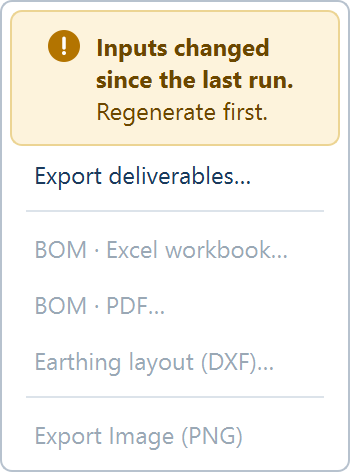
Export deliverables… stays enabled. Its window opens and says the layout is out of date, and nothing can be written from it until you click Generate Layout. The other four items are disabled, with that sentence as their reason. See Out-of-date results.
Exports outside the menu
Some exports belong to a tool and sit with it.
| Where | Control | Writes |
|---|---|---|
| SLD view, Export card | PDF…, DWG… | The diagram as you built, edited or traced it. See Exporting the diagram |
| Earthing Design window | Export DXF…, Export BoQ…, Export PDF report… | The earthing drawing, its quantities and its report. See Earthing design |
| Yield tab | Export TMY data CSV | The energy series behind the run. See Energy charts and time-series export |
| Robot count from DXF window | Export PDF… | The robot count report. See Robot count from DXF |
| The expanded view | Save | The plot as it is on screen |
What an export needs
Active access. Exports need it: Export deliverables… when you open its window, the others when you run them. When access is missing the application opens the License / Subscription window. See Activating access.
These stay free without access: saving a project, a BOM profile file, the clean copy of a KMZ, and a company file.
A finished run. The Earthing exports are refused while a layout or cable run is in progress: "A layout or cable run is in progress. Export when it finishes." The package waits in the same way, and its window says what it is waiting for.
Where to go next
Line reference
Every entry in the built-in BOM profile, by category, with its unit, how it is counted and when it applies, and what feeds the quantities.
Export deliverables
The window that writes the package - presets, deliverables, project details, company, folder, what each state says, and how files are named.