Company
File ▸ Company… sets the name, logo, drawing-number pattern and revision scheme the title blocks print, saved on this computer with a copy in each project.
A company is what the package's title blocks say about who made them: a name, a logo, an address, a drawing-number pattern and a revision scheme. Set one up once in File ▸ Company…. It is saved on this computer, and each project keeps its own copy.
Open the window from the File menu, or from Manage companies… on the Company card in Export deliverables. The strip at its top says what the project uses: "This project uses: Example Solar Engineering" or "This project uses: no company".
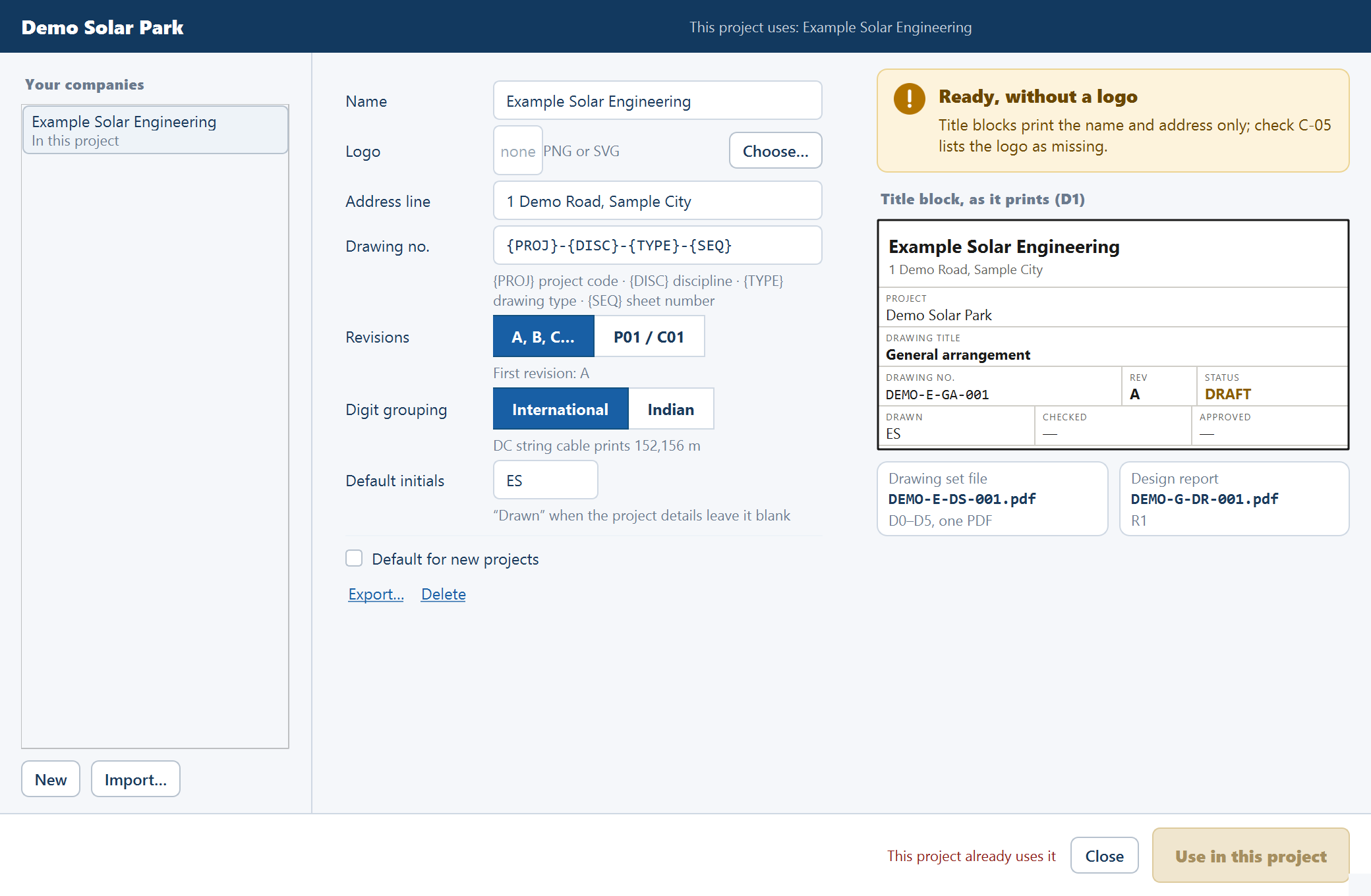
Your companies
The list on the left holds the companies saved on this computer. New starts one and Import… reads an exported company file.
| Line under the name | Means |
|---|---|
| "Default for new projects · in this project" | Both of the below. A ★ marks the default |
| "Default for new projects" | New projects take it |
| "In this project" | The open project uses it |
| "Logo file missing" | Its logo isn't beside it on this computer |
| "In this project · not on this computer" | The project carries a company you haven't saved here. It shows first, in italics, and is read-only |
| "A, B, C… · International" | Otherwise, its scheme and digit grouping |
The form
| Field | What it does |
|---|---|
| Name | Required: printed on every title block |
| Logo | A PNG or SVG file. Choose… picks it and Remove clears it |
| Address line | One line, under the name |
| Drawing no. | The pattern for drawing numbers and file names |
| Revisions | A, B, C… or P01 / C01. See Issuing a revision |
| Digit grouping | International or Indian. Under Indian, "DC string cable prints 1,65,992 m" |
| Default initials | Printed as "Drawn" when the project details leave it blank |
| Default for new projects | Tick to have new projects take this company |
Export… writes the company to one file, with its logo inside, to take to another computer. Delete removes it from this computer: "Delete X from this computer? Projects that use it keep their copy."
The drawing-number pattern
The pattern builds every drawing number and file name in the package. The default is
{PROJ}-{DISC}-{TYPE}-{SEQ}, which gives DEMO-E-GA-001.
| Token | Stands for |
|---|---|
{PROJ} | The project code |
{DISC} | The discipline: G, E or C |
{TYPE} | The drawing type, such as GA or BL |
{SEQ} | The sheet number, three digits counting within the type |
Each token appears at most once and {SEQ} is required. The rest may be letters, digits,
spaces and - _ . /. The series and their letters are listed in
Export deliverables.
| Message | What it means |
|---|---|
"The pattern needs {SEQ}, the sheet's number." | Add {SEQ} |
| "A brace is not closed." | A token is missing its closing brace |
| A token "appears more than once." | Remove the repeat |
A token "is not a token; use {PROJ}, {DISC}, {TYPE} or {SEQ}." | Correct the spelling |
The preview
The right side says whether the company is ready, then shows Title block, as it prints (D1), with tiles for the Drawing set file and Design report names.
| Verdict | Detail |
|---|---|
| No name yet | "Title blocks print "Company not set" until it has one." |
| The pattern can't number sheets | "Drawing numbers and file names fall back to the default pattern until it is fixed." |
| Ready, without a logo | "Title blocks print the name and address only; check C-05 lists the logo as missing." |
| Ready for title blocks | "Every field C-05 checks is filled in." |
Check C-05 informs only. See Design checks.
Using a company in a project
The primary button names what it does.
| Button | When | Effect |
|---|---|---|
| Use in this project | A saved company the project doesn't use | Copies it into the project. Disabled when "This project already uses it" |
| Save and use in this project | A company with unsaved edits, or a new one | Saves it here and copies it in. Disabled with "Give the company a name first" or "Fix the drawing-number pattern first" |
| Save to my companies | A company the project carries and this computer doesn't | Saves it here |
Save keeps edits to a saved company without touching the project, and Close leaves. Choosing a company marks the project changed and runs the design checks again. The status line reads "Company: X".
A project keeps its own copy. Editing a saved company doesn't change a project until you choose the company there again. A project keeps printing the same title block on another computer, logo included.
New projects take the default, and so does a project opened without a company: "Company set to X, the default". If that company has gone from this computer, the status line reads "The default company 'X' is no longer on this computer."
Notices in the window
These appear in place, without a separate box.
| Notice | Means |
|---|---|
| "Discard the changes to X?" | You moved away from unsaved edits |
| "X is saved on this computer already. Replace it with the one in <file>?" | An import has the same name |
| "The logo must be a PNG or SVG file." | Choose another file |
| "A company named 'X' is saved already." | Choose another name |
| "Not an exported company." | The file isn't a company file. They end .company.json |
| "Exported to <name>." | The file is written |
Where it is stored
Companies are in the SolarLayout_Company folder in your user folder, one
.company.json file each with its logo beside it. Reading and writing a company file needs
no access.
Where to go next
Issuing a revision
What issuing a package does - purposes, revision schemes, the record kept in the project, and where the revision prints.
Saving and reopening projects
The .slp project file keeps a working session — every input, the layout, hand edits, diagram, BOM edits and issued revisions — and reopens ready to work on, or says what changed.