Issuing a revision
What issuing a package does - purposes, revision schemes, the record kept in the project, and where the revision prints.
Issuing writes the package with a revision and a purpose stamped on every sheet and page, and keeps a record of that revision in the project file. It is the primary button in Export deliverables, Issue A for review. Use it when the package leaves your hands. Use Export draft package for anything else: a draft never uses up a revision.
Issuing depends on three things: a current layout, no run in progress, and a saved project. No design check holds it back. You can issue with checks failed or not yet checkable, and the package carries no check result. See Design checks.
Draft and issue
| Draft | Issue | |
|---|---|---|
| Title block REV | — | A |
| Title block STATUS | DRAFT | FOR REVIEW, FOR APPROVAL or FOR CONSTRUCTION |
| D0's band | "Draft · not issued", "Not for construction." | "FOR REVIEW", "Issued 5 Nov 2026 by AC." |
| Design report footer | "Rev — · DRAFT" | The revision and purpose |
| Kept in the project | Nothing | The record, and the design as it was |
| Saves the project | No | Yes, before writing and after |
The Issue card
The card shows on the right of the window while the layout is current.
| Field | What it does |
|---|---|
| Purpose | For review (default), For approval or For construction |
| Revision | Read only: the next revision and today's date, such as "A · 5 Nov 2026" |
| Description | Optional, at most 120 characters. What this issue is for, in one line: "Tender set", "Client comments of 12 Oct applied" |
| Issued by | Initials, at most 8 characters. Fills from the company's initials, and prints as Drawn when Drawn is empty. Empty, the window says "Initials are needed." |
The primary button follows the purpose. Its ▾ lists "Issue A for review", "Issue A for approval" and "Issue A for construction": choosing one sets the purpose and issues at once.
Issue a package
Save the project
The issued revision is kept in the project file, so a project never saved can't issue: "Save the project first: the issued revision is kept in it." See Projects.
Fill in the card
Pick the Purpose, add a Description if it helps, and check Issued by.
Click the primary button
The project is saved, the package is written with the revision and purpose, and a record is added and saved. A failed first save stops here, with The project could not be saved.
Send the folder
The banner confirms it: "A issued for review · 5 Nov 2026 · AC". Open folder opens the package.
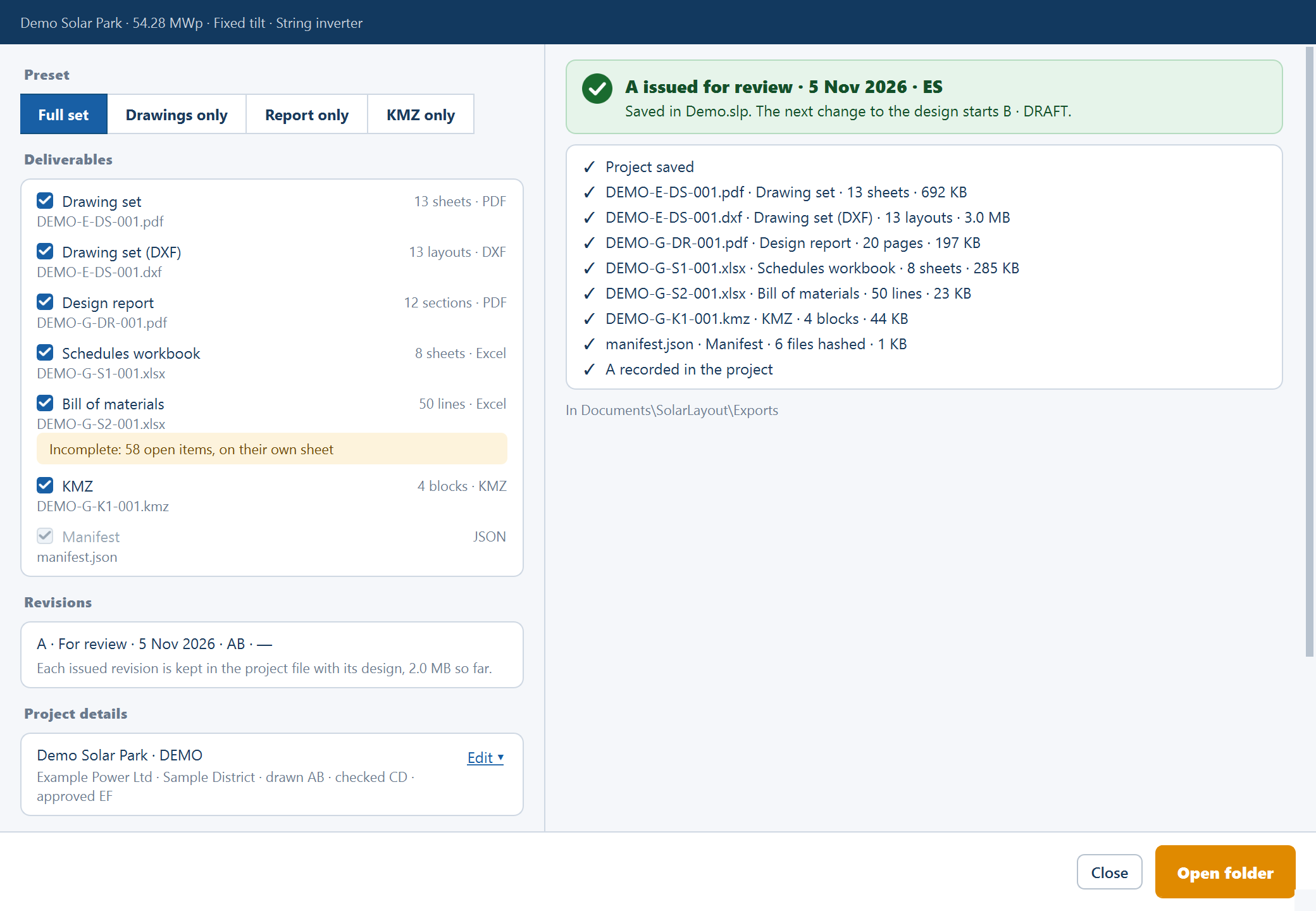
Two failures can follow the write, and each says what stands:
- "A was written but could not be recorded in the project".
- "A is recorded, but the project could not be saved", with the reason and "Save it with File ▸ Save project to keep A."
Revision schemes
The company chooses the scheme, in Revisions on Company.
| Scheme | How it counts | Example |
|---|---|---|
| A, B, C… (default) | One past the newest, whatever the purpose. The first is A and Z is the last | A, B, C |
| P01 / C01 | Review and approval count P, construction counts C | P01, C01, then P02 on the next review |
Under P01 / C01 the menu reads "Issue P01 for review", "Issue P01 for approval" and "Issue C01 for construction".
If you change the scheme after issuing A, the letters on record stay and the next issue is P01.
Where the revision prints
- Every title block, in REV and STATUS.
- D0, in its status band and revision history.
- The design report, on the cover, in the running footer and in section 12.1.
- The schedules workbook, in the README's Revision, Status and Issued rows.
- The BOM workbook, in its header's Revision and Issued rows.
- The manifest.
- The folder name, such as
AUD · Rev A · For review · 2026-11-05.
The revision history has the columns Rev, Date, Purpose, Description, Drawn, Checked and Approved. The description reaches the history and the manifest, never a folder name.
What the project keeps
Each issue keeps its revision, purpose, date, initials, description, drawn, checked and approved, the manifest, and a frozen copy of the design as it was issued. The Revisions card lists them in the window, one line each: "A · For review · 5 Nov 2026 · AB · Tender set".
Each kept revision grows the project file. It is a record of what you sent: no screen opens it and nothing writes a package again from it, so keep the folder you sent as well.
Where to go next
Schedules and KMZ
The package's schedules workbook, bill of materials, Google Earth file, piles.csv and manifest - what each holds, column by column.
Company
File ▸ Company… sets the name, logo, drawing-number pattern and revision scheme the title blocks print, saved on this computer with a copy in each project.