Export deliverables
The window that writes the package - presets, deliverables, project details, company, folder, what each state says, and how files are named.
Export ▾ ▸ Export deliverables… writes the whole design as a package: the drawing set, the design report, the schedules workbook, the bill of materials, the KMZ and a manifest, into one new folder. Every file comes from one snapshot of the design, so the numbers agree from one file to the next.
The window has two sides: what to write on the left, and the state of the design on the right. It is not modal, and while a package is being written the main window stays usable. The strip at its top names the project, its capacity and its design: "Demo Solar Park · 54.28 MWp · Fixed tilt · String inverter".
A package goes out in one of two forms. A draft is stamped DRAFT on every sheet and page, with no revision on them. An issue is stamped with its revision and purpose, and the project keeps a record of it. See Issuing a revision.
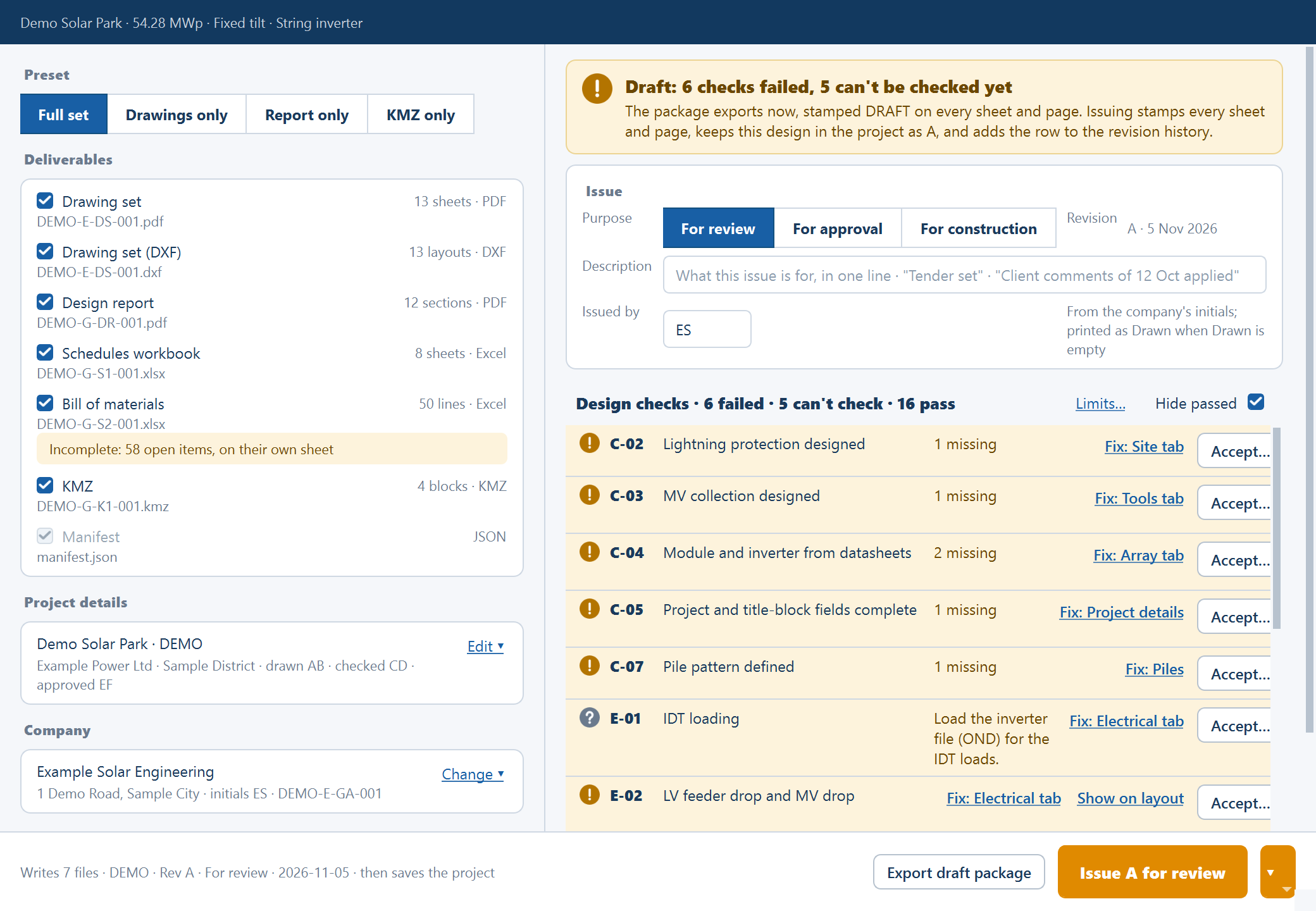
Write a draft package
Open the window
Generate a layout, then choose Export ▾ ▸ Export deliverables…. It needs active access when you open it. Asking again brings the open window forward.
Choose what goes
Pick a Preset, or tick the rows you want. Wait for the counts to replace Counting….
Fill in the title block
Open Project details and choose a Company. Both print on every title block, and without them the sheets print placeholders.
Choose the folder
Save into defaults to Documents/SolarLayout/Exports. Browse… picks
another. The last folder you used is saved in the project.
Write it
Click Export draft package. Each file reports as it finishes. When the banner reads "Package written: 7 files, 2.9 MB", click Open folder.
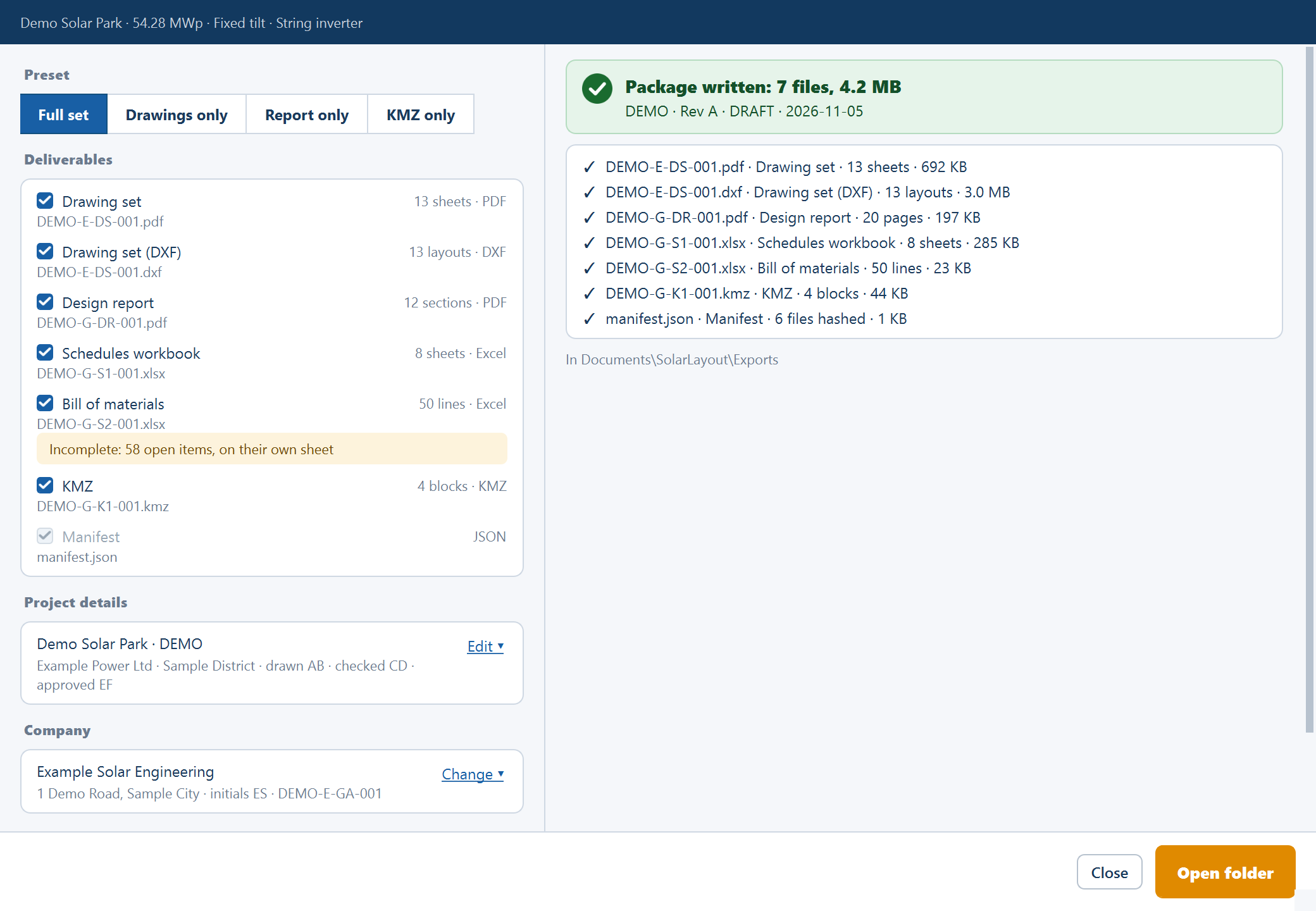
Once a package is written the window has finished its job. To write another, close it and open it again.
Preset
| Preset | Selects |
|---|---|
| Full set (default) | The drawing set in PDF and DXF, the design report, the schedules workbook, the bill of materials and the KMZ |
| Drawings only | The drawing set in PDF and DXF |
| Report only | The design report and the schedules workbook |
| KMZ only | The KMZ |
Deliverables
Each row has a tick, a count and its file name. A row that can't go is unticked and disabled, and says why. The examples below use the default drawing-number pattern with no project code.
| Row | Count, for example | File | When it can't go |
|---|---|---|---|
| Drawing set | "13 sheets · PDF" | PROJ-E-DS-001.pdf | "The drawing set could not be built: …" with the reason |
| Drawing set (DXF) | "13 layouts · DXF" | PROJ-E-DS-001.dxf | The same |
| Design report | "12 sections · PDF" | PROJ-G-DR-001.pdf | |
| Schedules workbook | "8 sheets · Excel" | PROJ-G-S1-001.xlsx | |
| Bill of materials | "35 lines · Excel" | PROJ-G-S2-001.xlsx | "The bill of materials is counted after Generate." |
| KMZ | "4 blocks · KMZ" | PROJ-G-K1-001.kmz | "The site's location is unknown (layout only), so a KMZ would put the plant in the wrong place." |
| Manifest | JSON | manifest.json | Always ticked, never a choice |
Two rows can carry a note. With a pile pattern, Drawing set adds "With
piles.csv: every pile's coordinates, for the pile layout sheets (D4)", and
piles.csv is written beside the drawings. With lines still to complete,
Bill of materials adds "Incomplete: 76 open items, on their own sheet".
Tick at least one deliverable. With none ticked, the reason beside the button reads "Tick a deliverable to export."
Project details
The card summarises the project as it prints. Empty, it reads "Not filled in" and lists the placeholders the title blocks will print. Fill in ▾ or Edit ▾ opens the form, and Done ▴ folds it.
| Field | What it does |
|---|---|
| Project name | Prints on every title block and on the report |
| Project code | Starts drawing numbers and file names. Without one they start PROJ |
| Client | Prints on every title block |
| Developer | Optional. Prints on the cover sheet |
| Location | Prints on every title block |
| Drawn, Checked, Approved | Initials, at most 8 characters each |
Each field is written when you press Enter or leave it. An edit marks the project changed and never makes the layout out of date.
Company
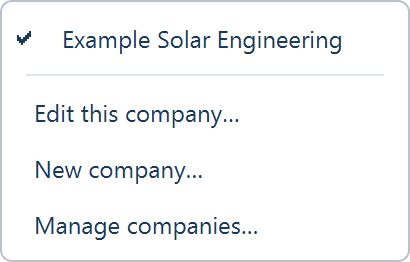
The card shows the company the title blocks print: its name, its address, its initials and the D1 drawing number. With none it reads "Not set", and every title block and the report's cover print "Company not set". Choose ▾ or Change ▾ opens a menu of your saved companies, with Edit this company…, New company… and Manage companies…. See Company.
The verdict and the checks
The right side opens with a banner that gives the state of the design and the check count, such as "Draft: 6 checks failed, 9 can't be checked yet" or "Draft: every check passed".
Below it are the Issue card and the same list of design checks as the Checks view. The checks inform; none of them holds back a draft or an issue, and no file in the package carries a check result. Whether to send a design with open checks is your decision.
A Fix link for project details opens the form in this window. Any other Fix, and Show on layout, closes the window and takes you to the place in the main window.
What each state says
| State | Primary button | Secondary button | Reason beside the buttons |
|---|---|---|---|
| Out of date | Export draft package, disabled | Close | "Inputs changed since the last run. Regenerate first." |
| Cables being routed | Export draft package, disabled | Close | "Cables are being routed. Export waits for the run." |
| Checks running | Export draft package, disabled | Close | "The design checks are running. Export waits for them." |
| Current, project never saved | Issue A for review, disabled | Export draft package | "Save the project first: the issued revision is kept in it." |
| Current, project saved | Issue A for review, with its ▾ | Export draft package | |
| Writing | Disabled | Cancel | |
| Written | Open folder | Close |
If the window can't count the deliverables, the banner reads The deliverables could not be counted with the reason. If a write fails, it reads The package could not be written. Enter never writes.
While it writes
The checks give way to a progress bar and a line per file: waiting, writing, then the file name with its size. The banner counts them: "3 of 7 files · design report".
- Cancel is checked between files and removes the folder: "Cancelled: nothing was written". Closing the window during a write does the same.
- A change to the layout stops the write: "The layout changed while the package was written. Nothing was kept: export again."
- So does a changed check limit or an energy run: "A check limit or the energy changed while the package was written. Nothing was kept: export again."
A cancel or a failure leaves no folder behind.
The folder and the file names
Every package goes into a new folder inside Save into. A draft's folder name
carries the project code, the word DRAFT and the date. An issue's carries the
code, the revision, the purpose and the date, such as AUD · Rev A · For review · 2026-11-05. Characters Windows refuses become -. A second package on the
same day gets (2), so nothing is ever overwritten.
File names and drawing numbers follow the company's pattern. The default is
{PROJ}-{DISC}-{TYPE}-{SEQ}, where {SEQ} is three digits counting within the
type.
| Series | Discipline | Type | Title |
|---|---|---|---|
| D0 | G | CV | Cover and drawing register |
| D1 | E | GA | General arrangement |
| D2 | E | BL | Block layout |
| D4 | C | PL | Pile layout |
| D6 | E | ER | Earthing layout |
| D5 | E | SL | Single line diagram |
| Drawing set file | E | DS | |
| R1 | G | DR | Design report |
| S1 | G | S1 | Schedules workbook |
| S2 | G | S2 | Bill of materials |
| K1 | G | K1 | KMZ |
Where to go next
Exports overview
The Export menu, what each item writes, the exports that sit with their own tools, and what each one needs before it runs.
The drawing set
The package's numbered sheets - cover, general arrangement, block, pile, earthing and single-line sheets - and the DXF twin that holds them in CAD.