Workings
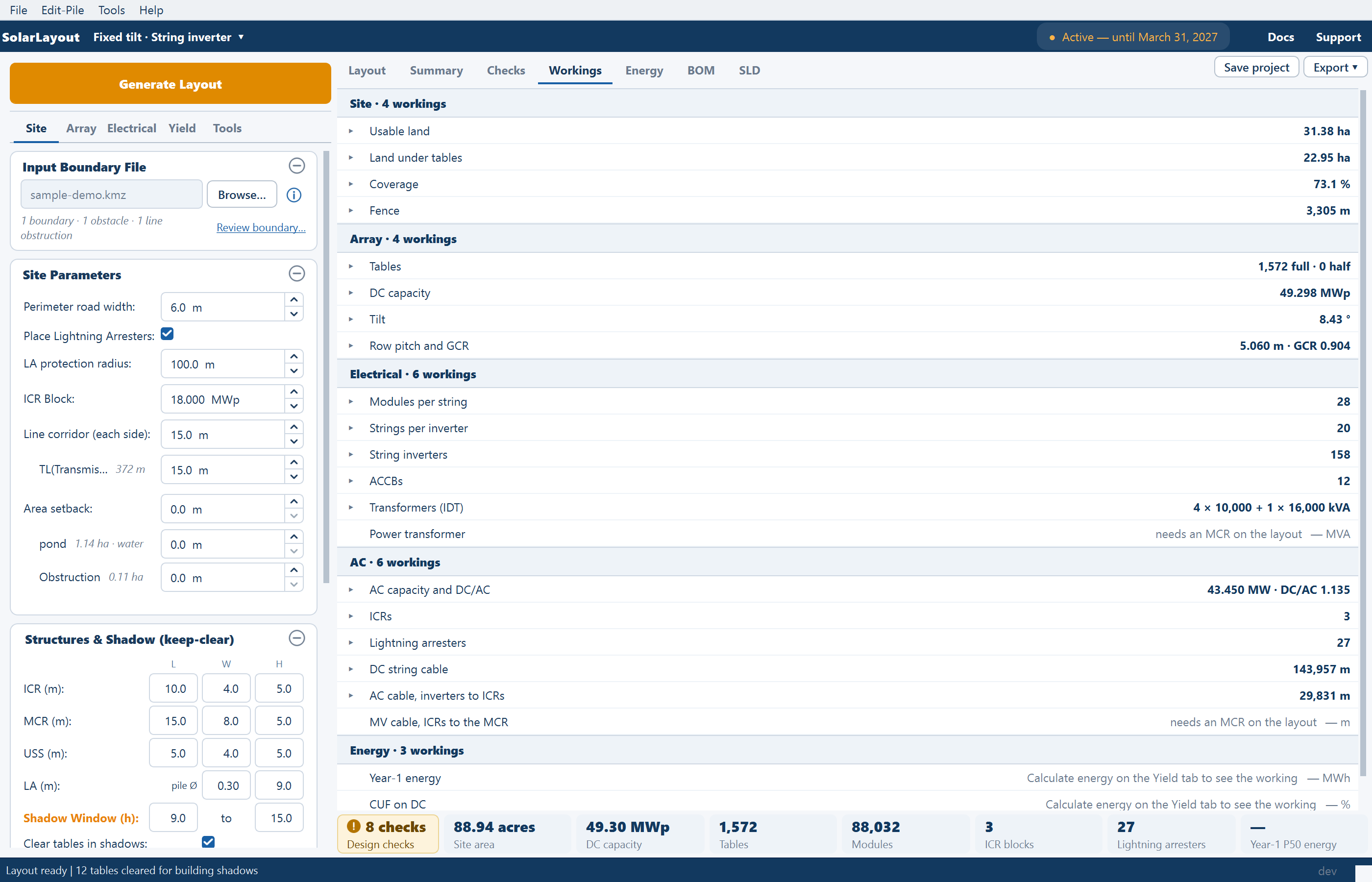
The Workings view — how each number in the design was reached: the rule, the arithmetic, the inputs it used and which rule decided it.
The Workings view shows how each number in the design was reached: the rule that applies, the arithmetic with your values in it, the inputs it used, and which rule won when several could have decided. Nothing is calculated again here. The view reads what the last run recorded, so it always matches the layout it describes.
Getting there
- The Workings tab (Ctrl+4).
- How? on a row of the Summary view. It appears at the right of a label when you hover over the row or select it, on figures that have a working, and opens this view at that row. See Summary view.
Before a layout exists the view reads "No workings yet" and "Generate a layout to see how each number is reached: the rule, the inputs it used, and which rule decided it."
Reading a working
The list has a header per group, "Site · 4 workings", and one row per working: its title, then its value and unit. Click a row to open it, or press Enter or Space on it; one is open at a time.
| Part | What it holds |
|---|---|
| Rule | The rule in words |
| Working | The arithmetic with your values, as text you can select and copy |
| Inputs | The values the rule used. Each input that has a field is a link: click it to go to the Layout view with that field in focus |
| Decided by | Which rule set the figure, where several could have |
| A table | By ICR, By piece or by kind, on the workings that break down that way |
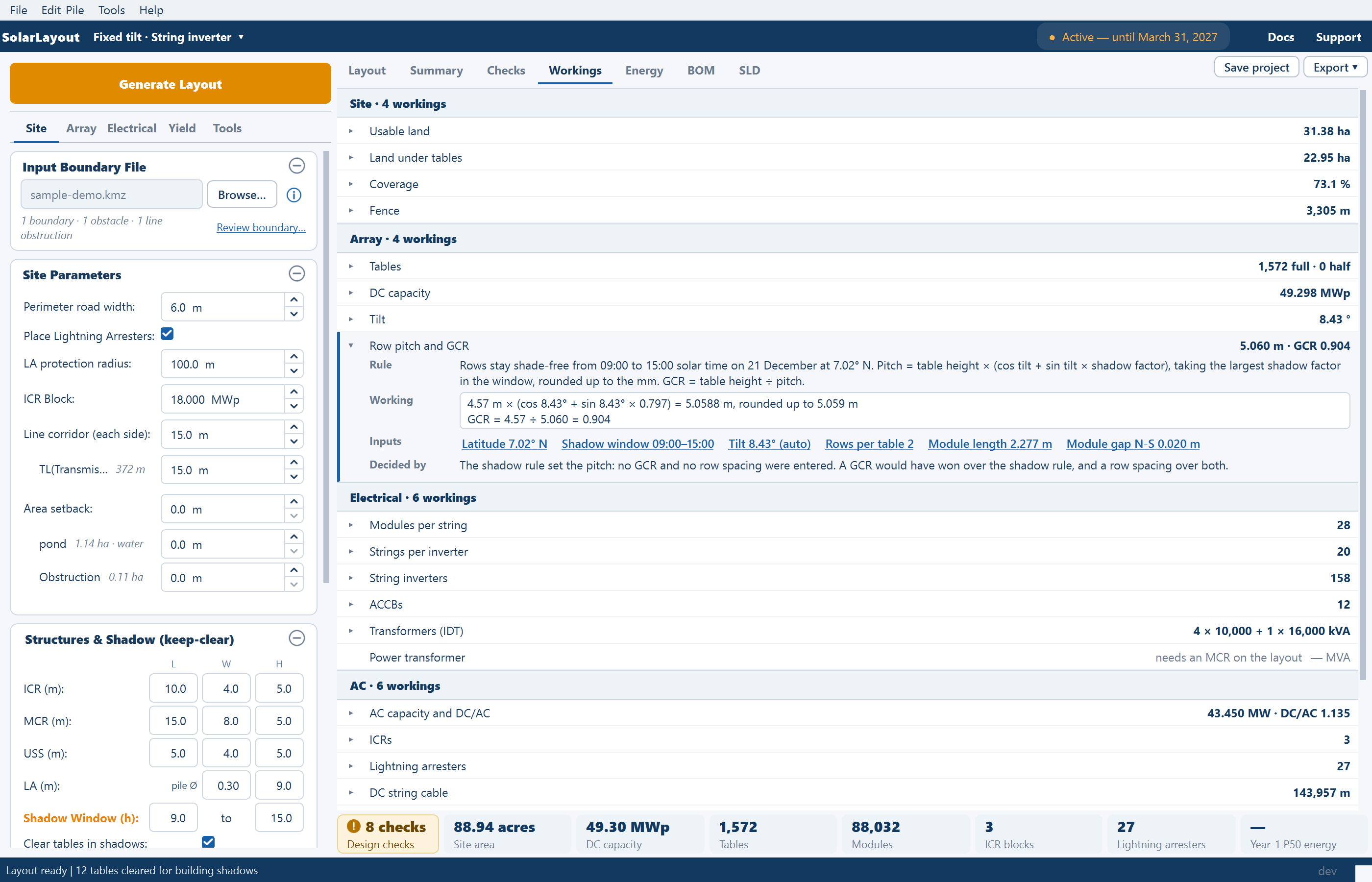
For example, on a fixed-tilt site with the shade-free pitch, Row pitch and GCR opens as:
| Part | Example |
|---|---|
| Rule | "Rows stay shade-free from 09:00 to 15:00 solar time on 21 December at 7.02° N. …" |
| Working | "4.78 m × (cos 8.43° + sin 8.43° × 0.797) = 5.2867 m, rounded up to 5.287 m" |
| Decided by | "The shadow rule set the pitch: no GCR and no row spacing were entered. A GCR would have won over the shadow rule, and a row spacing over both." |
Every working
Rows follow the design, so titles change with the mounting and the inverter type. A row whose figure can't be given shows the reason beside its title, and can't be opened until the reason is dealt with.
| Group | Working | Reason shown when it can't open |
|---|---|---|
| Site | Usable land (with a table by kind) · Land under tables · Coverage · Fence | Regenerate to see the working |
| Array | Tables or Trackers · DC capacity · Tilt or Max rotation · Row pitch and GCR or Tracker pitch and GCR | Regenerate to see the working |
| Electrical | Modules per string · Strings per inverter or per SMB · String inverters or SMBs · ACCBs (string design) · Transformers (IDT) | Regenerate to see the working |
| Central inverters (central design) | Turn on Calculate cables and regenerate to see the ICRs | |
| Power transformer | by others, needs an MCR on the layout, needs an OND file, or that cables are needed | |
| AC | AC capacity and DC/AC | needs an OND file, or Regenerate to see the working |
| ICRs (with a table by piece of land) | Regenerate to see the working | |
| Lightning arresters | Turn on Lightning arresters and regenerate | |
| DC string cable · AC cable, inverters to ICRs or DC trunk cable, SMBs to central inverters | That cables are needed | |
| MV cable, ICRs to the MCR, MV cable, ICRs to the handover point or MV cable | needs an MCR on the layout, by others | |
| Energy | Year-1 energy · CUF on DC | Calculate energy on the Yield tab to see the working, Calculate energy again to see the working |
| CUF on AC | As above, or needs an OND file |
A project saved before its run recorded a working shows Regenerate to see the working until you generate it again.
Tables in a working
The land rows list each named line and area of your boundary file at its own setback. See Site parameters.
The By ICR table has the columns ICR, Value, Working and a Show on layout link, which goes to the Layout view and fits it to that ICR's building. By piece rows, one per separate piece of land, have no link. To fit the view to a whole block, click the block's name in the Summary view's By block sheet.
Several plots
A multi-plot site gives one row per plot, "Tables · East", then a plant row, "Tables · plant", whose rule is "The sum of the plots." How? opens the plant row where there is one, and otherwise the first plot's. See Multi-plot sites.
While the layout is out of date
The same banner as the Summary view sits above the list, and the values are greyed: they describe the last run. See Out-of-date results.
Where the workings go
The view is not exported as such. The basis of the design, its working included, is printed in the design report. See The design report.
Where to go next
Design checks
The Checks view — when the checks run, how to read a row, Fix and Show on layout, accepting a finding, the badges on the plot, and where results go.
Out-of-date results
How the application knows a layout differs from its inputs, everything that says so, the exports it holds back meanwhile, and how the state clears.