Team workspaces
Work alone in your personal workspace, or share projects and hardware files with your team.
Every SolarLayout account has a personal workspace — it's where you've been working all along. You can also create or join team workspaces: shared spaces where a bid team works on the same projects and uses the same uploaded hardware files.
A SolarLayout plan is billed per workspace — the workspace carries the plan, and each plan includes seats (Basic 1, Pro 3, Pro Plus 5) that determine how many people can be in it. Need more people? Add seats as an add-on ($50 per seat / month on annual billing, $65 per seat / month on monthly billing). A team workspace is what those people share: the projects and the hardware library. Layout generation runs are unlimited on every paid plan, so there's no shared quota to draw down.
Nothing about your personal workspace changes when you join a team. It stays yours and stays private, and keeps its own projects.
Personal vs team
| Personal workspace | Team workspace | |
|---|---|---|
| Who sees the projects | Only you | Every member |
Uploaded .PAN / .OND files | Only you | Every member |
| Plan & billing | The workspace's own plan | The workspace's own plan, shared by the team |
| Seats | Included by the plan (start at 1) | Included by the plan, plus any seats you add |
| Who's in it | Just you — always | Whoever's been invited and accepted |
| How you get one | Created with your account | Anyone can create one, or join by invitation |
The plan belongs to the workspace — it's the workspace, not you, that carries the plan, and the plan's included seats cover everyone in it. Your seat is what travels with your account, so you can hold a seat in your personal workspace and in a team at the same time. What the team shares is the work: projects and the hardware library.
The rule of thumb: work lives where it was created. A project created while you're in the team workspace belongs to the team and every member can open it. A project created in your personal workspace is yours alone — joining a team never exposes your personal work.
Switching between workspaces
The workspace switcher sits at the bottom of the sidebar. It lists your personal workspace and every team you belong to — pick one and the whole app re-scopes to it: the projects list and the hardware library reflect the workspace you're in. Each workspace keeps its own plan, so what a workspace can do depends on the plan that workspace carries.
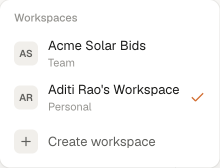
If you're mid-way through something when you switch, don't worry — you land on the dashboard of the workspace you switched to, and switching back puts everything exactly where you left it.
What a team workspace is good for
- One source of truth for a bid. The whole team works the same project — no emailing KMZs around, no "which version is current".
- Shared hardware library. One person uploads the module and inverter files for a tender; everyone designs with them. See Resource library for the file formats.
- Unlimited layout runs for everyone. Every member on a paid plan runs as many layouts as the bid needs — there's no shared quota to watch and no per-run charge. The workspace's plan covers everyone in it via its included seats; add seats as the team grows.
Where to next
- Invite your team — create a team workspace and bring people in.
- Roles & members — who can do what, and how membership changes work.
- Plans & quotas — per-workspace plans, what each plan includes, and how a workspace subscribes.