The PDF report
The multi-page PDF export — headline figures, DFR, financials and charts — and the two ways to produce it.
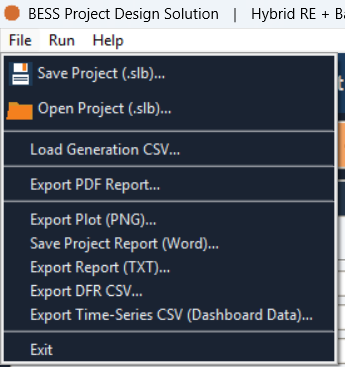
Export PDF Report… writes a multi-page PDF report covering the run's headline figures, its DFR detail, its financial results, and its charts, in a single file you can hand off outside the application.
Two ways to export
The same report comes from two places in the application, and both produce the same file:
| Where | Label |
|---|---|
| File menu | Export PDF Report… |
| Summary tab toolbar | 📥 Export PDF |
The save dialog is titled Save PDF Report, and the file name it suggests
follows the pattern BESS_Report_<date>.pdf.
Both buttons need this device activated — the same requirement as ▶ Simulate, ⚙ Optimise, and every other report or data export covered in this section. See How access works.
What it contains
The report brings together four parts of the same run, in a single file:
- Headline figures — the summary numbers a reviewer reads first. The same figures, read on screen rather than exported, are on the summary report.
- DFR detail — the run's Delivery Fulfilment Ratio result. See Delivery Fulfilment Ratio (DFR) for what it measures, and the DFR table for the same monthly detail on screen.
- Financials — the return metrics and year-by-year cash flow behind the run. See the financials table.
- Charts — the same run drawn as charts. See the dashboard.